
Airbnb recently completed our first large-scale, LLM-driven code migration, updating nearly 3.5K React component test files from Enzyme to use React Testing Library (RTL) instead. We’d originally estimated this would take 1.5 years of engineering time to do by hand, but — using a combination of frontier models and robust automation — we finished the entire migration in just 6 weeks.
In this blog post, we’ll highlight the unique challenges we faced migrating from Enzyme to RTL, how LLMs excel at solving this particular type of challenge, and how we structured our migration tooling to run an LLM-driven migration at scale.
Background
In 2020, Airbnb adopted React Testing Library (RTL) for all new React component test development, marking our first steps away from Enzyme. Although Enzyme had served us well since 2015, it was designed for earlier versions of React, and the framework’s deep access to component internals no longer aligned with modern React testing practices.
However, because of the fundamental differences between these frameworks, we couldn’t easily swap out one for the other (read more about the differences here). We also couldn’t just delete the Enzyme files, as analysis showed this would create significant gaps in our code coverage. To complete this migration, we needed an automated way to refactor test files from Enzyme to RTL while preserving the intent of the original tests and their code coverage.
How We Did It
In mid-2023, an Airbnb hackathon team demonstrated that large language models could successfully convert hundreds of Enzyme files to RTL in just a few days.
Building on this promising result, in 2024 we developed a scalable pipeline for an LLM-driven migration. We broke the migration into discrete, per-file steps that we could parallelize, added configurable retry loops, and significantly expanded our prompts with additional context. Finally, we performed breadth-first prompt tuning for the long tail of complex files.
1. File Validation and Refactor Steps
We started by breaking down the migration into a series of automated validation and refactor steps. Think of it like a production pipeline: each file moves through stages of validation, and when a check fails, we bring in the LLM to fix it.
We modeled this flow like a state machine, moving the file to the next state only after validation on the previous state passed:
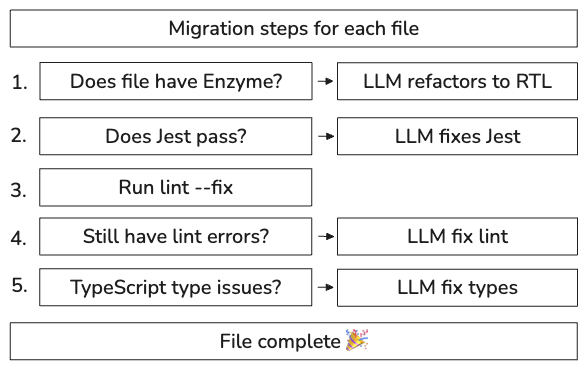
This step-based approach provided a solid foundation for our automation pipeline. It enabled us to track progress, improve failure rates for specific steps, and rerun files or steps when needed. The step-based approach also made it simple to run migrations on hundreds of files concurrently, which was critical for both quickly migrating simple files, and chipping away at the long tail of files later in the migration.
2. Retry Loops & Dynamic Prompting
Early on in the migration, we experimented with different prompt engineering strategies to improve our per-file migration success rate. However, building on the stepped approach, we found the most effective route to improve outcomes was simply brute force: retry steps multiple times until they passed or we reached a limit. We updated our steps to use dynamic prompts for each retry, giving the validation errors and the most recent version of the file to the LLM, and built a loop runner that ran each step up to a configurable number of attempts.
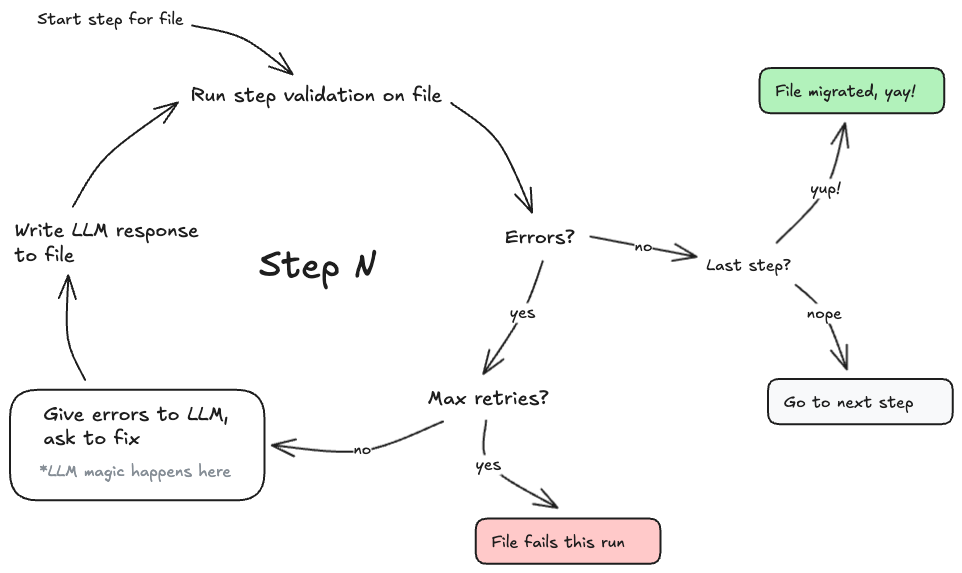
With this simple retry loop, we found we could successfully migrate a large number of our simple-to-medium complexity test files, with some finishing successfully after a few retries, and most by 10 attempts.
3. Increasing the Context
For test files up to a certain complexity, just increasing our retry attempts worked well. However, to handle files with intricate test state setups or excessive indirection, we found the best approach was to push as much relevant context as possible into our prompts.
By the end of the migration, our prompts had expanded to anywhere between 40,000 to 100,000 tokens, pulling in as many as 50 related files, a whole host of manually written few-shot examples, as well as examples of existing, well-written, passing test files from within the same project.
Each prompt included:
- The source code of the component under test
- The test file we were migrating
- Validation failures for the step
- Related tests from the same directory (maintaining team-specific patterns)
- General migration guidelines and common solutions
